채팅 레이아웃
오류
function Avatar({ name }, { name: string })

:세미 콜론이 아닌 , 쉼표 확인

function Bubble({ me, text }, { me: boolean, text: string })

, 쉼표 확인
framer-motion lucide-react 설치
npm install framer-motion lucide-react

framer-motion → 애니메이션 처리 (메시지 나타나고 사라질 때 부드럽게)

lucide-react → 아이콘 세트 (Send, Paperclip, Smile 같은 아이콘)
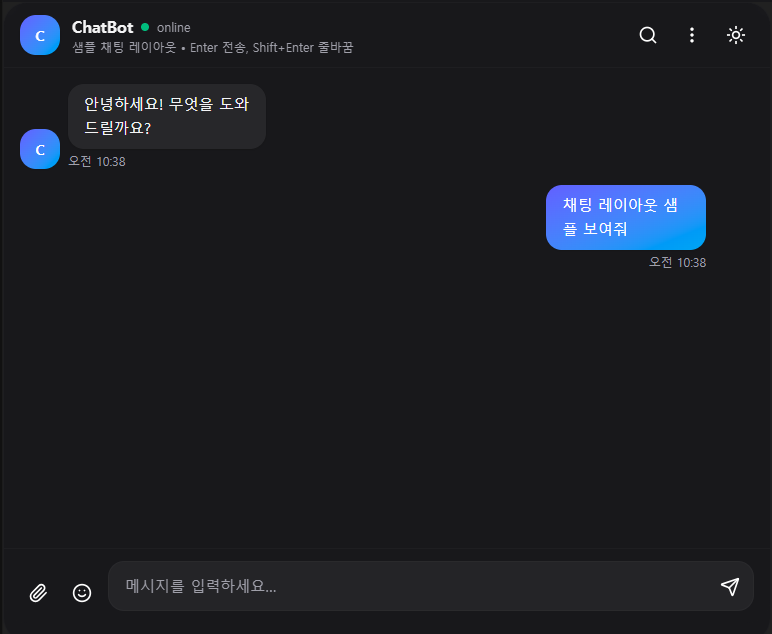
채팅 레이아웃 코드
import React, { useEffect, useMemo, useRef, useState } from "react";
import { motion, AnimatePresence } from "framer-motion";
import { Send, Paperclip, Smile, Search, MoreVertical, Moon, Sun } from "lucide-react";

// 기본 아바타 이니셜 렌더러
function Avatar({ name }) {
  const initials = useMemo(() => {
    const parts = name.trim().split(" ");
    const first = parts[0]?.[0] ?? "?";
    const second = parts[1]?.[0] ?? "";
    return (first + second).toUpperCase();
  }, [name]);
  return (
    <div className="flex h-10 w-10 select-none items-center justify-center rounded-2xl bg-gradient-to-br from-indigo-500 to-sky-500 text-sm font-semibold text-white shadow">
      {initials}
    </div>
  );
}

// 말풍선
function Bubble({ me, text }) {
  return (
    <motion.div
      initial={{ opacity: 0, y: 8, scale: 0.98 }}
      animate={{ opacity: 1, y: 0, scale: 1 }}
      exit={{ opacity: 0, y: 4 }}
      transition={{ type: "spring", stiffness: 400, damping: 28 }}
      className={`w-full rounded-2xl px-4 py-2 text-[15px] leading-relaxed shadow-sm break-words ${
        me
          ? "bg-gradient-to-br from-indigo-500 to-sky-500 text-white"
          : "bg-white/90 text-gray-800 ring-1 ring-black/5 dark:bg-zinc-800 dark:text-zinc-100 dark:ring-white/10"
      }`}
          style={{ wordBreak: "break-word" }} /////
    >
      {text}
    </motion.div>
  );
}

// 메인 컴포넌트 (Next.js / CRA 어디서든 사용 가능)
export default function ChatSample() {
  const [dark, setDark] = useState(true);
  const [input, setInput] = useState("");
  const [messages, setMessages] = useState([{
    id: crypto.randomUUID(),
    user: "bot",
    name: "ChatBot",
    text: "안녕하세요! 무엇을 도와드릴까요?",
    time: new Date().toLocaleTimeString([], { hour: "2-digit", minute: "2-digit" }),
  },
  {
    id: crypto.randomUUID(),
    user: "me",
    name: "우주혁",
    text: "채팅 레이아웃 샘플 보여줘",
    time: new Date().toLocaleTimeString([], { hour: "2-digit", minute: "2-digit" }),
  }]);
  const [typing, setTyping] = useState(false);
  const scrollRef = useRef(null);

  // 새 메시지 올 때 자동 스크롤
  useEffect(() => {
    const el = scrollRef.current;
    if (el) el.scrollTop = el.scrollHeight;
  }, [messages, typing]);

  function sendMessage() {
    const text = input.trim();
    if (!text) return;

    const now = new Date().toLocaleTimeString([], { hour: "2-digit", minute: "2-digit" });
    const myMsg = { id: crypto.randomUUID(), user: "me", name: "우주혁", text, time: now };
    setMessages((m) => [...m, myMsg]);
    setInput("");

    // typing indicator + 봇 응답 샘플
    setTyping(true);
    const timeout = setTimeout(() => {
      setMessages((m) => [
        ...m,
        {
          id: crypto.randomUUID(),
          user: "bot",
          name: "ChatBot",
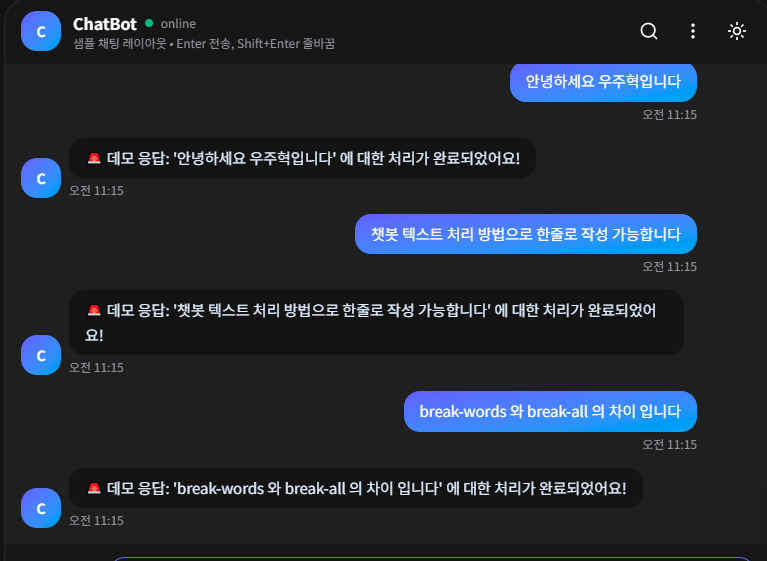
          text: `\uD83D\uDEA8 데모 응답: '${text}' 에 대한 처리가 완료되었어요!`,
          time: new Date().toLocaleTimeString([], { hour: "2-digit", minute: "2-digit" }),
        },
      ]);
      setTyping(false);
    }, 700);

    return () => clearTimeout(timeout);
  }

  function onKeyDown(e) {
    if (e.key === "Enter" && !e.shiftKey) {
      e.preventDefault();
      sendMessage();
    }
  }

  return (
    <div className={`${dark ? "dark" : ""} h-[640px] w-full max-w-3xl rounded-3xl border border-black/10 bg-zinc-50 shadow-2xl shadow-black/5 dark:border-white/10 dark:bg-zinc-900`}>
      {/* 헤더 */}
      <div className="flex items-center justify-between gap-2 rounded-t-3xl border-b border-black/5 bg-white/70 px-4 py-3 backdrop-blur dark:border-white/10 dark:bg-zinc-900/60">
        <div className="flex items-center gap-3">
          <Avatar name="ChatBot" />
          <div>
            <div className="flex items-center gap-2">
              <h2 className="text-base font-semibold text-zinc-900 dark:text-zinc-100">ChatBot</h2>
              <span className="h-2 w-2 rounded-full bg-emerald-500" />
              <span className="text-xs text-zinc-500 dark:text-zinc-400">online</span>
            </div>
            <p className="text-xs text-zinc-500 dark:text-zinc-400">샘플 채팅 레이아웃 • Enter 전송, Shift+Enter 줄바꿈</p>
          </div>
        </div>
        <div className="flex items-center gap-2">
          <button className="rounded-2xl p-2 hover:bg-zinc-100 dark:hover:bg-zinc-800" aria-label="search">
            <Search className="h-5 w-5" />
          </button>
          <button className="rounded-2xl p-2 hover:bg-zinc-100 dark:hover:bg-zinc-800" aria-label="more">
            <MoreVertical className="h-5 w-5" />
          </button>
          <button
            onClick={() => setDark((d) => !d)}
            className="rounded-2xl p-2 hover:bg-zinc-100 dark:hover:bg-zinc-800"
            aria-label="toggle theme"
            title="Toggle theme"
          >
            {dark ? <Sun className="h-5 w-5" /> : <Moon className="h-5 w-5" />}
          </button>
        </div>
      </div>

      {/* 메시지 영역 */}
      <div ref={scrollRef} className="custom-scrollbar h-[480px] space-y-4 overflow-y-auto px-4 py-4">
        {messages.map((m) => (
          <div key={m.id} className={`flex items-end gap-2 ${m.user === "me" ? "justify-end" : ""}`}>
            {m.user === "bot" && <Avatar name={m.name} />}
            <div className={`flex max-w-[85%] flex-col ${m.user === "me" ? "items-end" : "items-start"}`}>
              <Bubble me={m.user === "me"} text={m.text} />
              <span className="mt-1 text-xs text-zinc-500 dark:text-zinc-400">{m.time}</span>
            </div>
            {m.user === "me" && <div className="h-10 w-10" />}
          </div>
        ))}

        <AnimatePresence>
          {typing && (
            <motion.div
              initial={{ opacity: 0 }}
              animate={{ opacity: 1 }}
              exit={{ opacity: 0 }}
              className="flex items-center gap-2"
            >
              <Avatar name="ChatBot" />
              <div className="flex items-center gap-1 rounded-2xl bg-white/90 px-3 py-2 ring-1 ring-black/5 dark:bg-zinc-800 dark:text-zinc-100 dark:ring-white/10">
                <span className="inline-block h-2 w-2 animate-bounce rounded-full bg-zinc-500 [animation-delay:-200ms]" />
                <span className="inline-block h-2 w-2 animate-bounce rounded-full bg-zinc-500 [animation-delay:-100ms]" />
                <span className="inline-block h-2 w-2 animate-bounce rounded-full bg-zinc-500" />
              </div>
            </motion.div>
          )}
        </AnimatePresence>
      </div>

      {/* 입력창 */}
      <div className="flex items-end gap-2 rounded-b-3xl border-t border-black/5 bg-white/70 px-4 py-3 backdrop-blur dark:border-white/10 dark:bg-zinc-900/60">
        <button className="rounded-2xl p-2 hover:bg-zinc-100 dark:hover:bg-zinc-800" aria-label="attach">
          <Paperclip className="h-5 w-5" />
        </button>
        <button className="rounded-2xl p-2 hover:bg-zinc-100 dark:hover:bg-zinc-800" aria-label="emoji">
          <Smile className="h-5 w-5" />
        </button>

        <div className="relative flex-1">
          <textarea
            value={input}
            onChange={(e) => setInput(e.target.value)}
            onKeyDown={onKeyDown}
            rows={1}
            placeholder="메시지를 입력하세요…"
            className="block w-full resize-none rounded-2xl border border-black/10 bg-white/90 px-4 py-3 pr-12 text-[15px] leading-6 outline-none ring-0 placeholder:text-zinc-400 focus:border-indigo-400 dark:border-white/10 dark:bg-zinc-800/80 dark:text-zinc-100"
          />
          <button
            onClick={sendMessage}
            className="absolute bottom-1.5 right-1.5 rounded-xl p-2 hover:bg-zinc-100 dark:hover:bg-zinc-700"
            aria-label="send"
          >
            <Send className="h-5 w-5" />
          </button>
        </div>
      </div>

      {/* 커스텀 스크롤바 (선택) */}
      <style>{`
        .custom-scrollbar::-webkit-scrollbar { height: 10px; width: 10px; }
        .custom-scrollbar::-webkit-scrollbar-thumb { background: rgba(0,0,0,0.15); border-radius: 9999px; }
        .dark .custom-scrollbar::-webkit-scrollbar-thumb { background: rgba(255,255,255,0.2); }
        .custom-scrollbar::-webkit-scrollbar-track { background: transparent; }
      `}</style>
    </div>
  );
}
챗봇 텍스트 처리 방법
break-words (Tailwind CSS 클래스)
- 동작: 이 클래스는 CSS 속성인 word-break: break-word;에 해당합니다.
- 기능: 단어가 컨테이너의 끝에 도달했을 때, 단어 전체를 다음 줄로 넘기는 대신 단어 중간에서 강제로 줄바꿈합니다. 하지만 이 속성은 단어가 너무 길어 컨테이너를 넘어갈 경우에만 적용됩니다. 일반적인 단어 사이의 공백은 존중합니다.
특징: Tailwind CSS를 사용하기 때문에 클래스 이름만으로 간편하게 적용할 수 있습니다.
word-break: "break-all" (인라인 스타일)
- 동작: 이 CSS 속성은 word-break: break-all;입니다.
- 기능: 단어의 길이와 관계없이 컨테이너의 경계에 닿는 순간 무조건 줄바꿈합니다. 이 속성은 긴 URL이나 연속된 문자열과 같은 경우에 특히 유용하며, break-words보다 더 공격적으로 줄바꿈을 수행합니다. 공백을 무시하고 무조건 컨테이너 너비를 맞추려 합니다.
- 특징: Tailwind CSS 클래스로는 직접 제공되지 않으며, 인라인 스타일이나 별도의 CSS 파일에 작성해야 합니다.
framer-motion 설치 후 서버 실행 불가
프로젝트 루트에 설치 후 npm run dev 실행 시 정상 작동

'알토르' 카테고리의 다른 글
| 알토르 2주차 Python/Flask/API (0) | 2026.05.07 |
|---|---|
| Git / Github (0) | 2026.05.06 |
| 알토르 2주차 NEXT.js로 포트폴리오 제작-2 (0) | 2026.05.05 |
| 알토르 2주차 NEXT.js로 포트폴리오 제작 (0) | 2026.05.04 |
| React 입문 5가지: SPA/MPA, JSX, 컴포넌트, Props/State, create-react-app 설치까지 (0) | 2026.05.03 |