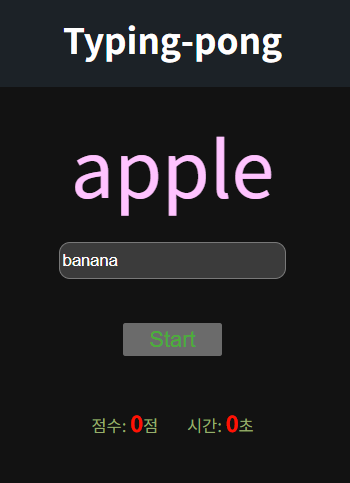
const wordDisplay = document.querySelector('.word-display');
const wordInput = document.querySelector('#word-input');
let wordList = ['apple', 'banana', 'cherry', 'date', 'elderberry'];
// console.dir(wordDisplay);

wordDisplay.innerText = wordList[0];

wordInput.addEventListener("keydown", function() {
    if(event.key === 'Enter') {
        if (wordInput.value === wordDisplay.innerText) {
            wordDisplay.innerText = wordList[1];
    }


    }
})


// wordInput.addEventListener("keydown", function() {
//    alert("pressed");
// })
const wordDisplay = document.querySelector('.word-display');
const wordInput = document.querySelector('#word-input');
let wordList = ['apple', 'banana', 'cherry', 'date', 'elderberry'];
console.dir(wordDisplay);

wordDisplay.innerText = wordList[0];

function onKeyDown()
{
    if(event.key === 'Enter')
    {
        // alert("pressed");->>>
        입력값 <--> 예시값 EX) apple <---> banana
    }
}
사용자의 입력값 : banana == wordInput.value
사이트의 예시값: apple == wordDisplay.innerText, wordList [0]

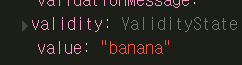
const wordDisplay = document.querySelector('.word-display');
const wordInput = document.querySelector('#word-input');
let wordList = ['apple', 'banana', 'cherry', 'date', 'elderberry'];
console.dir(wordDisplay);

wordDisplay.innerText = wordList[0];

function onKeyDown()
{
    if(event.key === 'Enter')
    {
      if (wordInput.value === wordDisplay.innerText) { //// wordInput.value === currentWord
              alert(SAME);
    }
}
<!DOCTYPE html>
<html lang="en">
<head>
    <meta charset="UTF-8">
    <meta name="viewport" content="width=device-width, initial-scale=1.0">
    <title>Typing-pong</title>
    <link rel="stylesheet" href="type.css">
</head>
<body>
    <div class="game-title">
        <h1>Typing-pong</h1>
    </div>
    <div class="word-display">
    단어
    </div>
    <input type="text" id="word-input" placeholder="Type here...">
    <button id="start-button">Start</button>
    <div class="game-info">
        <p> 점수: <span class="score">0</span>점</p>
        <p> 시간: <span class="time">0</span>초</p>
</body>
</html>
<script src="type.js"></script>
const wordDisplay = document.querySelector('.word-display');
const wordInput = document.querySelector('#word-input');
let wordList = ['apple', 'banana', 'cherry', 'date', 'elderberry'];
// console.dir(wordDisplay);

wordDisplay.innerText = wordList[0];

wordInput.addEventListener("keydown", function() {
    if(event.key === 'Enter') {
        if (wordInput.value === wordDisplay.innerText) {
            wordDisplay.innerText = wordList[1];
    }


    }
})
'알토르' 카테고리의 다른 글
| 알토르 1주차 ES6 (5) | 2025.08.12 |
|---|---|
| 알토르 1주차 - Typing game 3 (0) | 2025.08.12 |
| 알토르 1주차 - Typing game (1) | 2025.08.12 |
| 알토르 1주차 인스타 (0) | 2025.08.11 |
| 알토리 0주차 JavaScript (5) | 2025.08.11 |

